Python 简单爬虫测试
本文记录了作者学习 Python 后的爬虫实践,使用 requests 库发送 HTTP 请求获取网页内容,结合 BeautifulSoup 库解析 HTML 并提取所需数据。文章包含了 Python 语法基础回顾、IDE 配置(PyDev)说明,以及爬虫代码的完整示例。
关于Python
一直在Java的小世界里混迹,有句话说: “Life is short, you need Python!”
多么简洁? 好奇心还是忍不住小学一下.(- - 其实学不到两天)
”HelloWorld” 例子
// Java
class Main {
    public static void main(String[] args) {
        String str = "HelloWorld!";
        System.out.println(str);
    }
}# Python 2
str = 'HelloWorld'
print str乍一看 Python 确实很爽!简明了当,节省时间。
至于效率,我相信不管是任何语言,作为开发者最重要的是思维的精简!也有人说:“Python 一时爽,重构火葬场”,但是 Python 的应用场景那么多,根据自己的需要来选择技术栈,肯定没错。Python 的确是一门值得学习的语言。
关于网络爬虫
这个东西我刚开始也不懂……随便抓个解释,淡淡地理解下:
网络爬虫(又被称为网页蜘蛛,网络机器人),是一种按照一定的规则,自动地抓取万维网信息的程序或者脚本。
真正的复杂而强大的爬虫有很多爬行算法和策略,而我写的这个例子简直是简之又简。Python 基础还没学完,就迫不及待地想做个东西来看看,于是就想到了写个网络爬虫来小练一下手。
我会经常看母校的学校新闻,于是就试着爬学校新闻,没事的时候拿出来看看。
因为学的甚少……这个爬虫的功能非常简单:就是把学校官网中最新的新闻下载下来,保存成静态网页,想看多少页都可以。
第一次写爬虫,我把这个简单的功能分成了 3 步:
- 第一步:先爬一条新闻,把它下载保存!
- 第二步:把这一页的所有新闻都爬下来,下载保存!
- 第三步:把前 N 页的所有新闻爬下来,下载保存!
写网页爬虫很重要的一点就是:分析网页元素。
一、爬取一个 URL
先爬一条新闻,把它下载保存。这里不用分析太多网页结构,就用纯字符串拼啊截啊就好了。
# 目标:甘肃农业大学新闻网板块 -> 学校新闻
# 爬取该页面的第一篇新闻
# coding:utf-8
import urllib

# 假设我们在网页源码中找到了这样一段 a 标签
str_html = '<a class="c43092" href="../info/1037/30577.htm" target="_blank" title="双联行动水泉乡工作组赴联系村开展精准扶贫">双联行动水泉乡...</a>'

# 通过纯字符串查找截取 href
hrefBeg = str_html.find('href=')
hrefEnd = str_html.find('.htm', hrefBeg)
href = str_html[hrefBeg+6: hrefEnd+4]
href = href[3:]  # 去掉前面的 ../
print href

# 截取标题
titleBeg = str_html.find(r'title=')
titleEnd = str_html.find(r'>', titleBeg)
title = str_html[titleBeg+7: titleEnd-1]
print title

# 拼接完整的 URL
url = 'http://news.gsau.edu.cn/' + href
print 'url: ' + url

# 请求网页并读取内容
content = urllib.urlopen(url).read()

# 将抓取的页面 content 写入本地 html 文件中
filename = title + '.html'
open(filename, 'w').write(content)
二、爬取一个页面的所有新闻
爬取本页面的所有新闻,每页有 23 篇。这个时候就要稍微分析下:这 23 个 URL,每个 URL 怎么找?
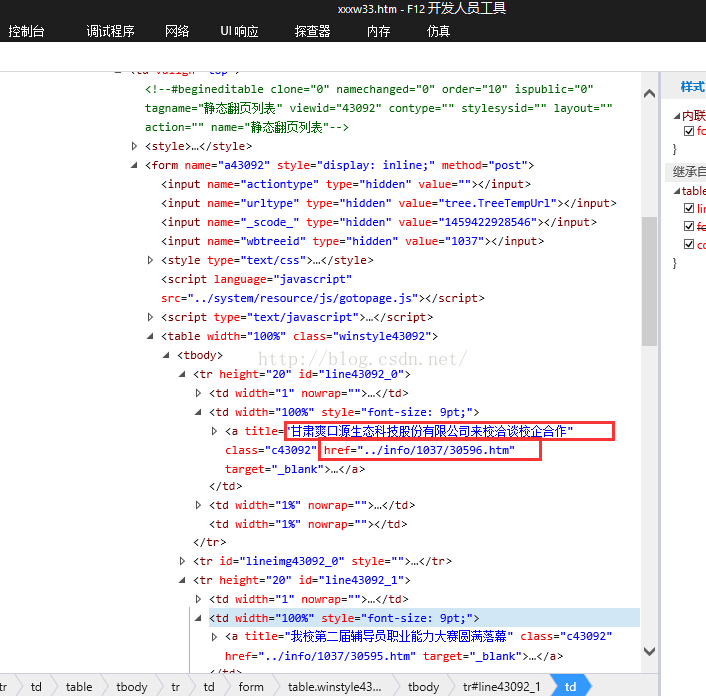
这里可以先锁定一个固定的 class 元素(如 class="c43092")进行查找,注意每次 find 时的起始位置规律。
这里我把每个 URL 都保存在一个数组中,检索完成后,再遍历数组对 URL 进行下载。
# coding:utf-8
import urllib
import time
import os

pageSize = 23
articleList = urllib.urlopen('http://news.gsau.edu.cn/tzgg1/xxxw33.htm').read()
urlList = [' '] * pageSize

# 锁定 class="c43092"
hrefClass = articleList.find('class="c43092"')
hrefBeg = articleList.find(r'href=', hrefClass)
hrefEnd = articleList.find(r'.htm', hrefBeg)
href = articleList[hrefBeg+6: hrefEnd+4][3:]

i = 0
while href != -1 and i < pageSize:
    urlList[i] = 'http://news.gsau.edu.cn/' + href

    # 从上一个结束位置继续往后找
    hrefClass = articleList.find('class="c43092"', hrefEnd)
    hrefBeg = articleList.find(r'href=', hrefClass)
    hrefEnd = articleList.find(r'.htm', hrefBeg)
    href = articleList[hrefBeg+6: hrefEnd+4][3:]

    print urlList[i]
    i = i + 1
else:
    print r'本页所有URL已提取完毕!!!'

# 将本页每一篇新闻下载到本地
j = 0
while j < pageSize:
    content = urllib.urlopen(urlList[j]).read()
    titleBeg = content.find(r'<TITLE>')
    titleEnd = content.find(r'</TITLE>', titleBeg)
    title = content[titleBeg+7: titleEnd]

    print urlList[j] + r' 正在下载...'
    time.sleep(1) # 礼貌爬虫,稍微停顿一下

    # 注意中文编码问题,保存到 GsauNews 文件夹下
    open(r'GsauNews' + os.path.sep + title.decode('utf-8').encode('gbk') + '.html', 'w+').write(content)
    j = j + 1
else:
    print r'当页全部url下载完毕!'
三、爬取多页所有新闻
这里要爬取 N 个页面,首先就要分析分页数据。正好主页最下面给出了总页数,直接用它!
看下最近几页的 URL 规律:
http://news.gsau.edu.cn/tzgg1/xxxw33.htm 第一页
http://news.gsau.edu.cn/tzgg1/xxxw33/221.htm 第二页
http://news.gsau.edu.cn/tzgg1/xxxw33/220.htm 第三页对比分页数据,很容易发现规律,就是:fenyeCount - pageNo + 1。
这里很烦的一点是:除了第一页以外的其他页,源码中都会掺杂前一页的一部分网页数据。导致我找了半天,做了很多 if else 判断才把它们过滤掉。
# coding:utf-8
import urllib
import time
import os

pageCount = 4
pageSize = 23
pageNo = 1
urlList = [' '] * pageSize * pageCount

# 动态分析总页数
# <td width="1%" align="left" id="fanye43092" nowrap="">共5084条  1/222 </td>
indexContent = urllib.urlopen('http://news.gsau.edu.cn/tzgg1/xxxw33.htm').read()
fenyeId = indexContent.find('id="fanye43092"')
fenyeBeg = indexContent.find('1/', fenyeId)
fenyeEnd = indexContent.find(' ', fenyeBeg)
fenyeCount = int(indexContent[fenyeBeg+2: fenyeEnd])

i = 0
while pageNo <= pageCount:
    if pageNo == 1:
        articleUrl = 'http://news.gsau.edu.cn/tzgg1/xxxw33.htm'
    else:
        articleUrl = 'http://news.gsau.edu.cn/tzgg1/xxxw33/'+ str(fenyeCount-pageNo+1) + '.htm'

    print r'--------共爬取'+ str(pageCount) + '页  当前第' + str(pageNo) + '页  URL:' + articleUrl
    articleList = urllib.urlopen(articleUrl).read()

    while i < pageSize * pageNo:
        # 过滤多余数据的恶心判断逻辑...
        if pageNo == 1:
            if i == pageSize * (pageNo-1):
                hrefId = articleList.find('id="line43092_0"')
            else:
                hrefId = articleList.find('class="c43092"', hrefEnd)
        else:
            if i == pageSize * (pageNo-1):
                hrefId = articleList.find('id="lineimg43092_16"')
            else:
                hrefId = articleList.find('class="c43092"', hrefEnd)

        hrefBeg = articleList.find(r'href=', hrefId)
        hrefEnd = articleList.find(r'.htm', hrefBeg)

        if pageNo == 1:
            href = articleList[hrefBeg+6: hrefEnd+4][3:]
        else:
            href = articleList[hrefBeg+6: hrefEnd+4][6:]

        urlList[i] = 'http://news.gsau.edu.cn/' + href
        print urlList[i]
        i = i + 1
    else:
        print r'========第'+str(pageNo)+'页url提取完成!!!'

    pageNo = pageNo + 1

print r'============所有url提取完成!!!============\n'

print r'==========开始下载到本地==========='
j = 0
while j < pageCount * pageSize:
    content = urllib.urlopen(urlList[j]).read()
    titleBeg = content.find(r'<TITLE>')
    titleEnd = content.find(r'</TITLE>', titleBeg)
    title = content[titleBeg+7: titleEnd]

    print title
    print urlList[j] + r' 正在下载...\n'
    time.sleep(1)
    open(r'GsauNews' + os.path.sep + title.decode('utf-8').encode('gbk') + '.html', 'w+').write(content)
    j = j + 1
else:
    print r'下载完成, 共下载'+str(pageCount)+'页, '+str(pageCount*pageSize)+'篇新闻'
看下控制台爬完的效果:
==================== RESTART: D:\python\CSDNCrawler03.py ====================
--------共爬取4页 当前第1页 URL:http://news.gsau.edu.cn/tzgg1/xxxw33.htm
http://news.gsau.edu.cn/info/1037/30596.htm
http://news.gsau.edu.cn/info/1037/30595.htm
...
========第1页url提取完成!!!

==========开始下载到本地===========
校长吴建民带队赴广河县开展精准扶贫和双联工作-新闻网
http://news.gsau.edu.cn/info/1037/30574.htm正在下载…
...一分多钟爬了 90 个网页。
当然代码还可以优化很多,比如用正则表达式或者 BeautifulSoup 来匹配自己想要的内容,而不是像这样苦哈哈地用 find 截取字符串。
以后的学习中继续改进,争取爬些更有意思的东西。做这个例子只是为了看看,初学 Python 到底能为我做些什么。