定制 icarus 主题记录
本文记录了将 Hexo 博客主题从 NexT 更换为 icarus 的过程。icarus 是一款相对小众但功能丰富的 Hexo 主题,采用响应式设计。文章详细记录了主题的安装步骤、NexT 与 icarus 的效果对比,以及作者进行的各项定制化配置(如侧边栏、评论系统、代码高亮、友链等),是 Hexo 主题定制化的实战参考。
前言
终于把用了两年多的NexT主题换掉了, 之前喜欢这个主题是因为黑白两色显得特别简洁!
但是已经看腻了哈哈哈哈哈哈哈哈哈哈哈哈, 换成了稍微小众点的icarus
两者效果图如下:
-
NexT
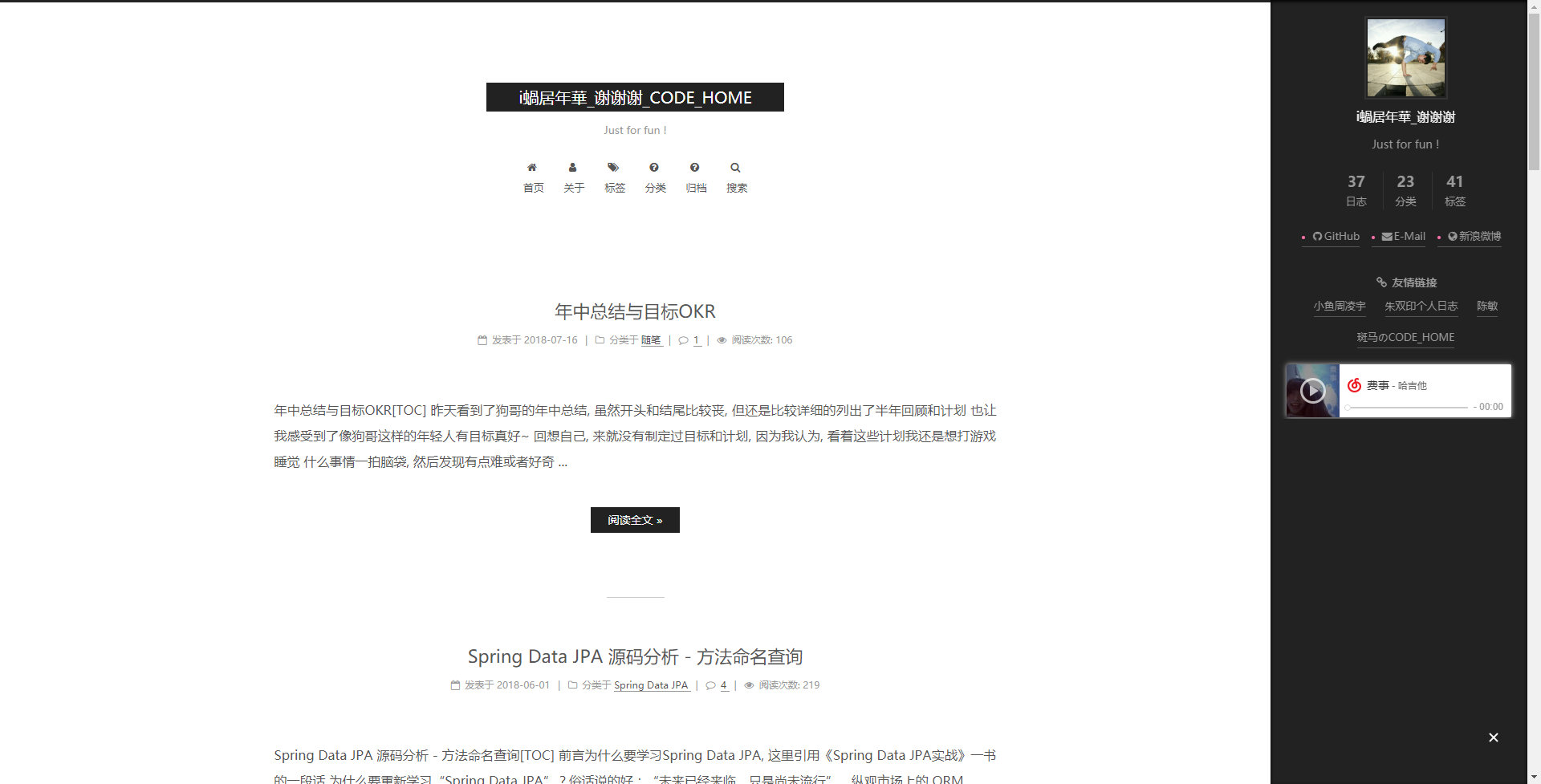
NexT主题 -
icarus
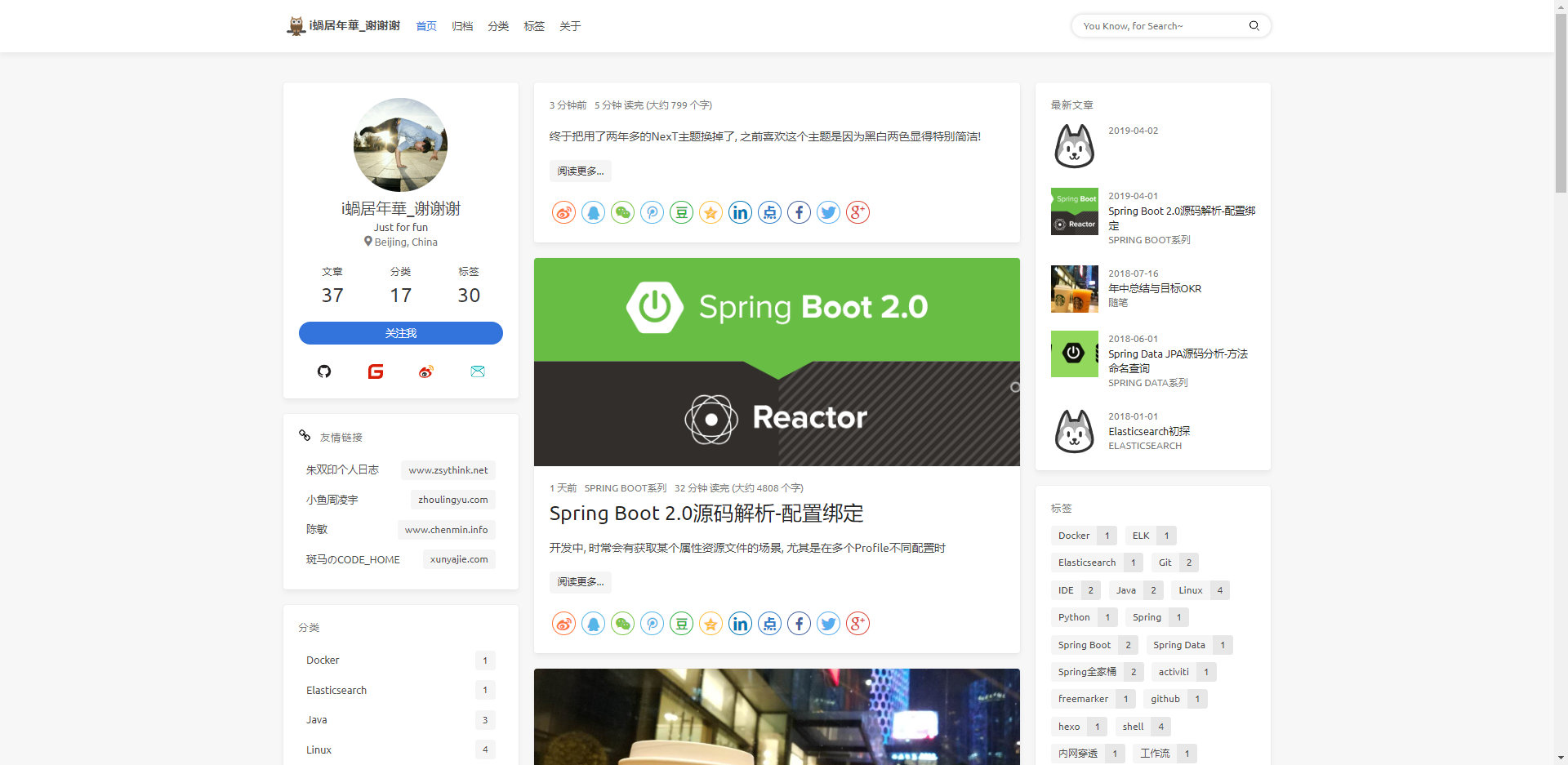
icarus主题
相较NexT, icarus使用的人数没有很多, 想要改什么在网上搜到的基本都是关于NexT的
虽然icarus也提供了很多配置, 但还是有些地方想按照自己意思做些修改, 强迫症~
有些无法通过配置完成的, 只能改源码了
作为后端开发前端知识匮乏, 还好icarus使用的是ejs, 一种模版语言, 类似以前用过的FreeMarker和Thymeleaf
变动日志
主题配置文件_config.yml的更改不记录了, 可参考文档: Documentation
主要记录源码部分的变动如下:
1. 修改 navbar 导航栏左边的 logo 配置方式
因为不会设计 Logo, 就改成 icon+文字 的方式, 并加入 logo.img 配置项
themes/hexo-theme-icarus/layout/common/navbar.ejs
2. 修改 navbar 导航栏右边的搜索功能
原版 2.3.0 只有一个小的搜索 icon, 加入搜索输入框并嵌入搜索 icon
themes/hexo-theme-icarus/layout/common/navbar.ejsthemes/hexo-theme-icarus/source/css/style.styl
3. 修改个人信息页中的几个 links
原版是通过 socialLinks 动态配置的, 不支持微信、码云、微博这几个常用链接, 这里为了方便我使用 <a>+<img> 标签写死
themes/hexo-theme-icarus/layout/widget/profile.ejs
4. 友情链接标题前加入 icon, 为了好看
themes/hexo-theme-icarus/layout/widget/links.ejs
5. 修改文章页 (index页和post页) 的文章时间
加入判断, 如果是列表页显示例如 几月前, 文章页显示具体日期, 例如 2018-12-22
themes/hexo-theme-icarus/layout/common/article.ejs
6. 修改文章详情页面不显示文章图片 thumbnail
在阅读文章时感觉有点花, 默认是 index 页和 post 页都会显示, 故将其关闭
themes/hexo-theme-icarus/layout/common/article.ejs
7. 修改首页文章列表摘要信息不显示样式
去掉 Markdown 生成的 html 标签, 类似简书上的文章排版, 整洁一点
themes/hexo-theme-icarus/layout/common/article.ejs
8. 修改文章页面布局
原版的主页和文章页都使用三栏布局, 在文章页阅读会显得内容很窄, 尤其是代码部分, 需要左右滚动, 故修改文章页为两栏布局
themes/hexo-theme-icarus/includes/helpers/layout.jsthemes/hexo-theme-icarus/layout/common/widget.ejsthemes/hexo-theme-icarus/layout/layout.ejsthemes/hexo-theme-icarus/source/css/style.styl
9. 目录的开启方式改为默认就开启文章目录
这样可以不用每个 md 文件都去写 toc: true
themes/hexo-theme-icarus/includes/helpers/config.js
10. 修改开启目录后的显示问题
默认目录在滚动文章时如果太长会显示不全, 所以增加目录粘性布局
themes/hexo-theme-icarus/layout/widget/toc.ejs
11. 文章页增加版权声明
themes/hexo-theme-icarus/layout/common/article.ejsthemes/hexo-theme-icarus/source/css/style.styl
12. 修改底部 footer 的显示信息
themes/hexo-theme-icarus/layout/common/footer.ejs
13. 加个猫
配合gulp压缩
主要是为了在hexo generate到public目录后, 压缩html, css, js等资源
经过压缩, 我的public目录大小从8MB降到5MB, 还是可以的
第一次用压缩工具, 记录下gulp的安装和使用, 及配合hexo icarus主题进行压缩时的几个问题
安装
npm install gulp --save
npm install gulp -g
还需要以下模块
- gulp-htmlclean: 清理html
- gulp-htmlmin: 压缩html
- gulp-minify-css: 压缩css
- gulp-uglify: 混淆js
- gulp-imagemin: 压缩图片
执行安装命令
npm install gulp-htmlclean gulp-htmlmin gulp-minify-css gulp-uglify gulp-imagemin --save最好在安装一个可以打印错误日志的工具, 之后会用到:
npm install --save-dev gulp-util建立任务
在hexo根目录建立文件gulpfile.js, 内容如下:
var gulp = require('gulp');
var minifycss = require('gulp-minify-css');
var uglify = require('gulp-uglify');
var htmlmin = require('gulp-htmlmin');
var htmlclean = require('gulp-htmlclean');
var imagemin = require('gulp-imagemin');
var gutil = require('gulp-util');

// 压缩html
gulp.task('minify-html', function() {
    return gulp.src('./public/**/*.html')
        .pipe(htmlclean())
        .pipe(htmlmin({
            removeComments: true,
            minifyJS: true,
            minifyCSS: true,
            minifyURLs: true,
        }))
        .pipe(gulp.dest('./public'))
});
// 压缩html
gulp.task('minify-xml', function() {
    return gulp.src('./public/**/*.xml')
        .pipe(htmlclean())
        .pipe(htmlmin({
            removeComments: true,
            minifyJS: true,
            minifyCSS: true,
            minifyURLs: true,
        }))
        .pipe(gulp.dest('./public'))
});
// 压缩css
gulp.task('minify-css', function() {
    return gulp.src('./public/**/*.css')
        .pipe(minifycss({
            compatibility: 'ie8'
        }))
        .pipe(gulp.dest('./public'));
});
// 压缩js
gulp.task('minify-js', function() {
    return gulp.src('./public/js/**/*.js')
        .pipe(uglify())
        .on('error', function (err) { gutil.log(gutil.colors.red('[Error]'), err.toString()); })
        .pipe(gulp.dest('./public'));
});

// 压缩图片
gulp.task('minify-images', function() {
    return gulp.src('./public/img/**/*.*')
        .pipe(imagemin(
            [imagemin.gifsicle({'optimizationLevel': 3}),
                imagemin.jpegtran({'progressive': true}),
                imagemin.optipng({'optimizationLevel': 7}),
                imagemin.svgo()],
            {'verbose': true}))
        .pipe(gulp.dest('./public/img'))
});
// 默认任务
gulp.task('default', [
    'minify-html','minify-xml','minify-css','minify-js','minify-images'
]);
使用
目前我还是手动的, 没有写到脚本里
- clean:
hexo clean - build:
hexo clean && hexo g - gulp:
hexo clean && hexo g && gulp - server:
hexo clean && hexo g && hexo s - deploy:
hexo clean && hexo g && gulp && hexo d
可以单独使用, 也可以写入脚本中
例如我平时发布就使用 deploy 中的三个命令, 顺序执行
问题一: gulp版本
在Hexo根目录执行 gulp, 错误如下:
AssertionError: Task function must be specified。版本问题导致的, 可以查看下 gulp 版本: gulp -v
修改 package.json 中的 gulp 版本为 3.x, 例如:
"dependencies": {
    "gulp": "^3.9.1",
    // ...
}
然后重新安装 gulp: npm install gulp
问题二: icarus主题中的js语法问题
接下来 gulp 可能会发生如下错误:
GulpUglifyError: unable to minify JavaScript原因是 javascirpt 语法问题,在 es5 环境里使用了 es6、es7 语法
因为上面安装部分和 gulpfile.js 中已经添加了错误打印, 可以看到具体的错误信息
我修改了如下 js 文件:
themes/hexo-theme-icarus/source/js/back-to-top.jsthemes/hexo-theme-icarus/source/js/clipboard.jsthemes/hexo-theme-icarus/source/js/main.js
然后就好啦