Aspose.Cells 与 Apache POI 导出 Excel 对比
本文对比了两款主流 Java Excel 操作库:Apache POI 和 Aspose.Cells。由于 FreeMarker 导出的 Excel 会产生格式警告问题,文章深入对比了两者在操作 Excel 时的差异,包括功能完整性(如大数据量导出、公式计算、图表支持)、开发体验、依赖包体积及商业授权等方面。为 Java 后端开发者在项目中选择合适的 Excel 导出方案提供了参考依据。
1. 背景与目的
在使用 FreeMarker 导出 Excel 时,由于其无法直接操作 Excel 文件,通常需要先将 Excel 模版转换为 XML 可读格式(.ftl),再进行模版元素和表达式的替换。这会导致用户打开生成的文件时出现如下警告提示:
文件格式和扩展名不匹配,文件可能已经损坏或不安全用户必须点击确认后才能打开文件,严重影响了用户体验。
目的:
本文旨在对比以下两款主流的 Java Excel 操作库:
- Apache POI - Java API for Microsoft Documents
- Aspose - Aspose.Cells for Java
通过对比两者在操作 Excel 时的差异,探讨如何解决上述格式警告问题,并评估两款产品在功能性和开发体验上的区别。
2. Apache POI
Apache POI 是 Apache 软件基金会提供的一款操作 Microsoft Office 格式文件的开源库,支持跨平台运行。
环境配置
- JDK 环境:1.5 或以上
- Maven 依赖:测试使用的 POI 版本为
3.11(撰文时最新 Release 版本为4.1.0)。
<dependency>
    <groupId>org.apache.poi</groupId>
    <artifactId>poi-ooxml</artifactId>
    <version>3.11</version>
    <type>jar</type>
    <scope>compile</scope>
</dependency>

<dependency>
    <groupId>org.apache.poi</groupId>
    <artifactId>poi-scratchpad</artifactId>
    <version>3.11</version>
    <type>jar</type>
    <scope>compile</scope>
</dependency>
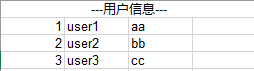
<span id="code1">代码示例(API 方式导出)</span>
public static void main(String[] args) throws Exception {
    HSSFWorkbook workbook = new HSSFWorkbook();
    HSSFSheet sheet = workbook.createSheet();

    HSSFCell cell = sheet.createRow(0).createCell(0);
    cell.setCellValue("---用户信息---");
    HSSFCellStyle cellStyle = cell.getCellStyle();

    // 标题行合并单元格
    sheet.addMergedRegion(new CellRangeAddress(0, 0, 0, 3));

    // 边框、单元格样式等设置略...
    List<Map<String, Object>> userList = getUserList();
    for (int i = 0; i < userList.size(); i++) {
        Map<String, Object> user = userList.get(i);
        HSSFRow row = sheet.createRow(i + 1);
        HSSFCell cell1 = row.createCell(0);
        HSSFCell cell2 = row.createCell(1);
        HSSFCell cell3 = row.createCell(2);

        cell1.setCellValue(i + 1);
        cell2.setCellValue(String.valueOf(user.get("name")));
        cell3.setCellValue(String.valueOf(user.get("address")));

        cell1.setCellStyle(cellStyle);
        cell2.setCellStyle(cellStyle);
        cell3.setCellStyle(cellStyle);
    }

    File outFile = new File("G:\\poi_output.xls");
    FileOutputStream outputStream = new FileOutputStream(outFile);
    workbook.write(outputStream);
}
3. Aspose.Cells
Aspose for Java
Aspose 为开发人员提供了广泛的 Java API,用于创建和管理处理各种格式文件的应用程序。其包含的丰富组件有:
- Aspose.Cells:处理 Microsoft Excel 和 OpenOffice 电子表格。
- Aspose.Words:处理 Microsoft Word 和 OpenOffice 文档。
- Aspose.Slides:处理 Microsoft PowerPoint 和 OpenOffice 演示文稿文件。
- Aspose.Pdf:用于创建和操作 PDF 文档。
- Aspose.BarCode:用于生成和识别条形码等。
Aspose.Cells for Java
官网:Aspose.Cells
Aspose.Cells for Java 是一个 Excel 电子表格报告组件。它不仅提供了基本的数据导出功能,还使 Java 应用程序无需依赖 Microsoft Excel 环境即可全面创建和管理 Excel 电子表格。
环境配置
- JDK 环境:1.6 或以上
- 依赖管理:在 Maven 构建的项目中,有两种引入方式。
方式一:通过 Maven 仓库引入
- 添加 Repository(由于 Aspose.Cells 非开源,需引入其专属的远程仓库地址):
<repository>
    <id>AsposeJavaAPI</id>
    <name>Aspose Java API</name>
    <url>https://repository.aspose.com/repo/</url>
</repository>- 引入依赖(测试版本为
19.4):
<dependency>
    <groupId>com.aspose</groupId>
    <artifactId>aspose-cells</artifactId>
    <version>19.4</version>
</dependency>
<dependency>
    <groupId>com.aspose</groupId>
    <artifactId>aspose-cells</artifactId>
    <version>19.4</version>
    <classifier>javadoc</classifier>
</dependency>
<dependency>
    <groupId>org.bouncycastle</groupId>
    <artifactId>bcprov-jdk16</artifactId>
    <version>1.46</version>
</dependency>- 修改 Maven Settings:
如果settings.xml中的mirrorOf配置为*,需将其修改,使其能够从 pom 中添加的 repository 下载依赖:
<mirror>
    ...
    <mirrorOf>*,!AsposeJavaAPI</mirrorOf>
    ...
</mirror>
方式二:手动下载 Jar 包
从 Aspose 官网(https://downloads.aspose.com/cells/java)直接下载对应版本的 jar 包,添加至项目 lib 中(适用于非 Maven 构建的项目)。
<span id="code2">代码示例(API 方式导出)</span>
public static void main(String[] args) throws Exception {
    String title = "巡检记录";
    List<String> columns = Lists.newArrayList(
            "序号", "巡检编号", "开始时间", "结束时间", "巡线人", "巡线总时长", "巡线里程(公里)", "事件上报");
    exportExcel(title, columns, fetchData());
}

public static void exportExcel(String title, List<String> columns, List<Map<String, String>> dataList) throws Exception {
    Workbook workbook = new Workbook();
    WorksheetCollection worksheets = workbook.getWorksheets();
    Worksheet worksheet = worksheets.get(0);
    Cells cells = worksheet.getCells();

    // 设置标题样式
    Style titleStyle = workbook.createStyle();
    titleStyle.getFont().setBold(true);
    titleStyle.setName("宋体");
    titleStyle.getFont().setSize(15);
    titleStyle.setHorizontalAlignment(TextAlignmentType.CENTER);
    titleStyle.setTextWrapped(true);
    wrapperStyle(titleStyle); // 假设此处有边框设置方法

    // 设置内容样式
    Style contentStyle = workbook.createStyle();
    contentStyle.setHorizontalAlignment(TextAlignmentType.CENTER);
    wrapperStyle(contentStyle);

    // 填充标题
    Cell titleCell = cells.get(0, 0);
    titleCell.setValue(title);
    titleCell.setStyle(titleStyle);
    cells.setRowHeight(0, 20);
    cells.setStandardWidth(25);
    cells.merge(0, 0, 1, 8);

    // 填充列名
    for (int i = 0; i < columns.size(); i++) {
        Cell cell = cells.get(1, i);
        cell.setValue(columns.get(i));
        cell.setStyle(titleStyle);
    }

    // 填充数据
    for (int i = 0; i < dataList.size(); i++) {
        Map<String, String> data = dataList.get(i);
        int rowIndex = i + 2;
        cells.get(rowIndex, 0).setValue(i + 1);
        cells.get(rowIndex, 0).setStyle(contentStyle);
        cells.get(rowIndex, 1).setValue("code" + i);
        cells.get(rowIndex, 1).setStyle(contentStyle);
        cells.get(rowIndex, 2).setValue(data.get("time"));
        cells.get(rowIndex, 2).setStyle(contentStyle);
        cells.get(rowIndex, 3).setValue(data.get("time"));
        cells.get(rowIndex, 3).setStyle(contentStyle);
        cells.get(rowIndex, 4).setValue(data.get("inspector"));
        cells.get(rowIndex, 4).setStyle(contentStyle);
        cells.get(rowIndex, 5).setValue(data.get("wholeTime"));
        cells.get(rowIndex, 5).setStyle(contentStyle);
        cells.get(rowIndex, 6).setValue(data.get("mileage"));
        cells.get(rowIndex, 6).setStyle(contentStyle);
        cells.get(rowIndex, 7).setValue(data.get("eventCount"));
        cells.get(rowIndex, 7).setStyle(contentStyle);
    }

    workbook.save("G:\\巡检记录_export_by_aspose.xls");
}
Excel 转换 PDF
Aspose.Cells for Java 从 2.3.0 版本开始引入了 Excel 到 PDF 的直接转换,无需单独引入 Aspose.PDF,也无须安装 Microsoft Office 环境。
代码示例:
public static void main(String[] args) throws Exception {
    String PATH_LINUX = "/root/office/";
    Workbook wb = new Workbook(PATH_LINUX + "巡检监控数据库表.xlsx");
    File pdfFile = new File(PATH_LINUX + "test.pdf");
    FileOutputStream fileOS = new FileOutputStream(pdfFile);
    wb.save(fileOS, SaveFormat.PDF);
}注意事项:
转换功能存在一定的官方限制。电子表格中指定的某些格式设置可能会丢失,且不支持所有图形对象。在实际测试中,复杂的格式转换为 PDF 时可能会出现错行现象。
4. 高级应用与授权管理
基于 Excel 模版导出
除了通过 API 操作元素样式导出外,Apache POI 和 Aspose.Cells 均支持基于 Excel 模版导出。此方式适用于导出样式复杂的报表场景,能大幅减少编码量。
代码示例(以 POI 为例):
public static void main(String[] args) throws Exception {
    File file = ResourceUtils.getFile("classpath:export\\userinfo.xls");
    FileInputStream inputStream = new FileInputStream(file);

    HSSFWorkbook workbook = new HSSFWorkbook(inputStream);
    HSSFSheet sheet = workbook.getSheetAt(0);

    HSSFCell cell = sheet.getRow(0).getCell(0);
    cell.setCellValue("---用户信息---");
    HSSFCellStyle cellStyle = cell.getCellStyle();

    List<Map<String, Object>> userList = getUserList();
    for (int i = 0; i < userList.size(); i++) {
        Map<String, Object> user = userList.get(i);
        HSSFRow row = sheet.createRow(i + 2);

        row.createCell(0).setCellValue(i + 1);
        row.createCell(1).setCellValue(String.valueOf(user.get("name")));
        row.createCell(2).setCellValue(String.valueOf(user.get("address")));
    }

    File outFile = new File("G:\\poi_output.xls");
    FileOutputStream outputStream = new FileOutputStream(outFile);
    workbook.write(outputStream);
}
Aspose 评估版本&授权&破解
上面使用的Apose Maven repos中引入的jar是Aspose.Cells for Java 的评估版。
评估版提供与产品的许可版本完全相同的功能, 但是有两个限制
-
第一个限制:已打开文件的数量
运行程序时,只能打开100个Excel文件。如果您的应用程序超过此数量,将引发异常。 -
第二个限制:会自动生成并聚焦到一个有警告信息的sheet页
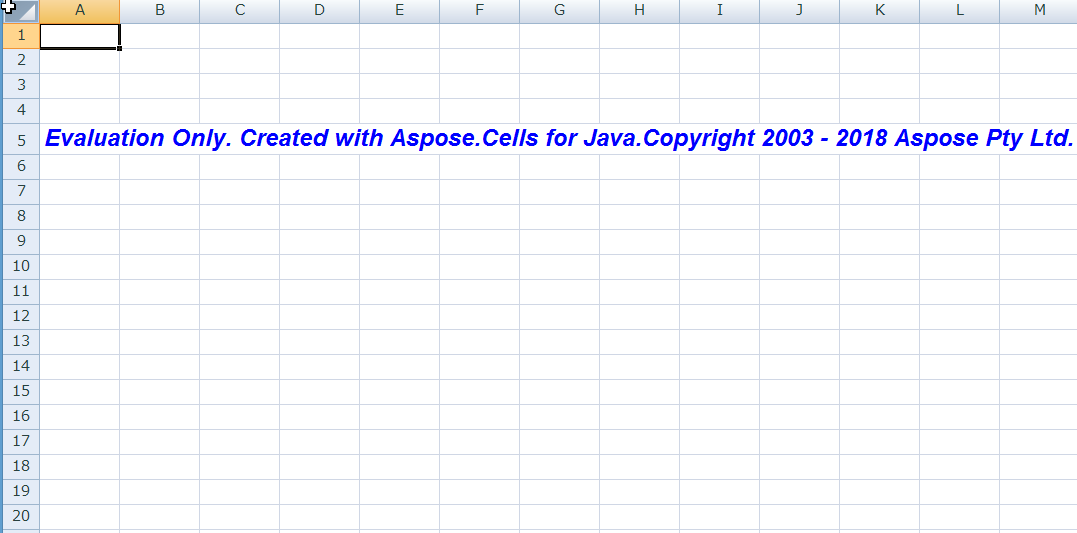
生成预览文件(如PDF)也会自动添加水印
授权方式
-
在Aspose网站上购买许可证
-
添加许可文件到项目中
-
在程序调用Aspose.Cells for Java API之前设置Licene授权, 例如:
License license = new License();
license.setLicense("license.xml");
// 操作 Excel API 相关代码...-
验证License
javaBoolean License.isLicenseSet() // 查看是否授权 Date License.getSubscriptionExpireDate() // 查看过期时间
破解版说明
Aspose.Cells for Java 网上的破解方案一般有两种
-
方式一: 原始jar + license许可文件
较老版本中可以找到类似的license许可文件, 例如
license.xmlxml<License> <Data> <Products> <Product>Aspose.Total for Java</Product> <Product>Aspose.Words for Java</Product> </Products> <EditionType>Enterprise</EditionType> <SubscriptionExpiry>20991231</SubscriptionExpiry> <LicenseExpiry>20991231</LicenseExpiry> <SerialNumber>8bfe198c-7f0c-4ef8-8ff0-acc3237bf0d7</SerialNumber> </Data> <Signature>sNLLKGMUdF0r8O1kKilWAGdgfs2BvJb/2Xp8p5iuDVfZXmhppo+d0Ran1P9TKdjV4ABwAgKXxJ3jcQTqE/2IRfqwnPf8itN8aFZlV3TJPYeD3yWE7IT55Gz6EijUpC7aKeoohTb4w2fpox58wWoF3SNp6sK6jDfiAUGEHYJ9pjU=</Signature> </License> -
方式二: 修改jar + license许可文件
通过修改并替换原始jar中的字节码文件, 改变license验证相关逻辑, 达到破解的目的
5. 总结
Apache POI 与 Aspose.Cells for Java 都能解决 FreeMarker 导出 Excel 文件时出现的警告提示问题。
对比
1. 常用导出场景支持
都支持两种常用的导出场景:
- 使用API操作元素导出: 适用于Excel样式不复杂
- 基于Excel 模版导出: 适用于导出样式复杂的报表场景, 减少编码量
2. 文档转换(Excel转PDF)
Apache POI 无法直接调用API转换, 需要使用例如Jacob 调用 Microsoft Office或WPS才能实现转换
Aspose.Cells for Java 从2.3.0版本后提供了PDF转换功能, 无需引入其它依赖, 也无需安装MS环境
但不适用于转换效果要求高, 实际测试中转换后的PDF会出现错行
3. 开发便捷
两者都提供了maven依赖, 可以在Maven 构建的项目中快速集成, 在开发上, 两者直接操作Excel的API类似, 并无太大区别, 详细功能代码差异参考
4. 功能
除了基本的导入, 导出场景, 列举一些在Aspose.Cell中提供, 而Apache POI中没有的功能
数据处理:
- 搜索查找数据: 根据值查找单元格
- 计算值: 通过API使用编程的方式, 计算单元格中的值
- 解析数组/集合中的元素导入工作表 & 从工作表中导出数据
- Aspose.Cells提供了大量内置函数和公式, 类似Excel中的计算工时
- 对数据进行排序
工作表:
- 给Excel添加水印
- 转换为HTML, PDF
- 显示和隐藏工作簿的滚动条, 选项卡, 更改选项卡颜色
- 加密Excel
- 使用多种编码读取CSV文件
- 创建数据透视表
| Aspose.Cells | Apache POI | |
|---|---|---|
| MS Office环境 | 不需要 | 不需要 |
| 支持基于模版导出 | 支持 | 支持 |
| 开源 | 否, 收费 | 是, 免费 |
| 使用难易 | 易 | 易 |
| 功能 | 丰富 | 基本 |